
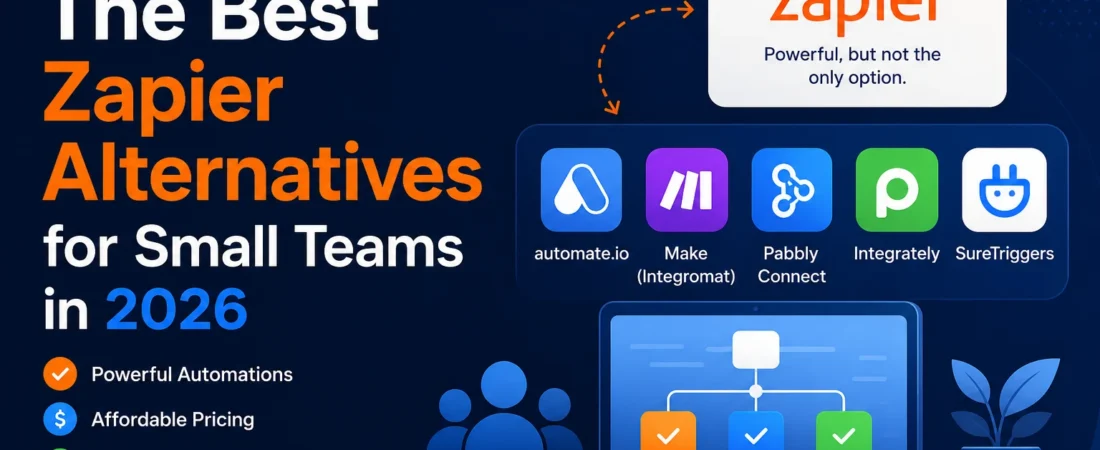
This page is for small business owners and team leads who are already using Zapier – or seriously evaluating it – and wondering whether the cost still makes sense. Zapier’s task-based pricing works well at scale. For smaller teams running a few hundred to a few thousand tasks a month, the math often doesn’t. Here you’ll find honest comparisons of the tools worth switching to, a framework for choosing the right one, and a step-by-step migration checklist.
TL;DR
- The main reason people leave Zapier: task-based pricing that can scale faster than usage
- Best free option: Make (1,000 credits/month on the free tier, with multi-step workflows)
- Best open-source option: n8n (free to self-host; cloud version is paid)
- Best for predictable costs: Pabbly Connect (task-based pricing with unlimited workflows on paid tiers, including an unlimited plan)
- CheapWorkflow in one line: flat monthly pricing built for small teams – no per-task surprises, no enterprise complexity
Why People Look for Zapier Alternatives
Zapier is genuinely good software. That’s worth saying upfront. But “good” and “right for your team” are different questions.
The task-based pricing model
In Zapier, a task is counted when an action completes successfully. If your Zap has three actions – say, it creates a row in a spreadsheet, sends a Slack message, and updates a CRM record – that’s three tasks every time the workflow runs. Run it 500 times a month and you’ve used 1,500 tasks from a single workflow.
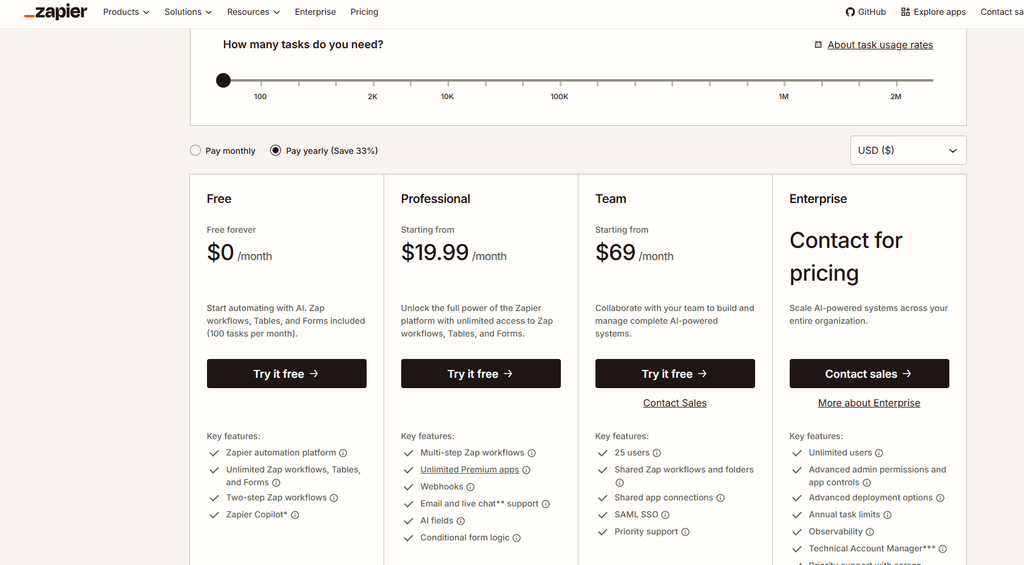
Zapier’s Free plan gives you 100 tasks/month and two-step Zap workflows. The Professional plan starts at $19.99/month when billed annually and includes 750 tasks/month, multi-step workflows, premium apps, and other advanced features. The Team plan starts at $69/month when billed annually and adds collaboration features such as shared workspaces, shared app connections, user roles, and SAML SSO. If you reach your task limit, paid plans can continue running through pay-per-task billing when that option is enabled, with overage tasks charged at a higher per-task rate than the base plan. Check Zapier’s current pricing page for the latest figures, as pricing and plan details can change.
The real problem: a team running 10 active workflows at moderate volume can burn through a task tier faster than expected. When that happens mid-month, costs can become harder to predict.
Complexity creep
Zapier is powerful. Multi-step Zaps with filters, formatters, conditional paths, and error handling can do a lot. But that power has a maintenance cost. A Zap that made sense when someone built it six months ago can become a fragile, confusing thing when the person who built it leaves or the connected app changes its API. For non-technical teams, debugging a broken multi-step Zap is genuinely painful.
Overkill for simple use cases
If your team connects three apps and runs a few hundred tasks a month, you’re paying for infrastructure you may not use. Zapier’s 9,000+ app integrations, AI automation features, and enterprise admin controls are impressive – and irrelevant if you just need a form submission to create a task in your project management tool.
None of this makes Zapier a bad product. It’s the right tool for complex, high-volume workflows where the cost is justified. The question is whether that’s your situation.
How to Choose the Right Zapier Alternative
Before you evaluate any specific tool, get clear on four things.
1. Pricing model. Task-based pricing (Zapier’s model) charges per successful action. Operation- or credit-based pricing (such as Make’s model) charges according to the work your workflow performs. Flat monthly pricing charges a fixed fee within the plan’s terms. For small teams, predictable usage-based or flat pricing can be easier to budget. Know your current monthly task count before you compare.
2. App integrations. “5,000+ integrations” is a marketing number. What matters is whether the tool connects your specific apps – your CRM, your email platform, your project management tool. Check the integration list before you commit.
3. Complexity ceiling. Can the tool handle conditional logic, multi-step workflows, and error handling? Or is it limited to simple trigger-and-action pairs? Match the tool’s ceiling to your actual workflows, not your hypothetical future ones.
4. Maintenance burden. Who on your team will own this? A tool that requires a developer to configure and maintain is not a no-code tool in practice. Be honest about your team’s technical comfort level.
The best alternative is the one that handles your actual workflows reliably – not the one with the most features or the lowest sticker price.
The Best Zapier Alternatives in 2026
These are the tools worth evaluating. Each entry covers what it’s genuinely good at and where it falls short.
Make (formerly Integromat)
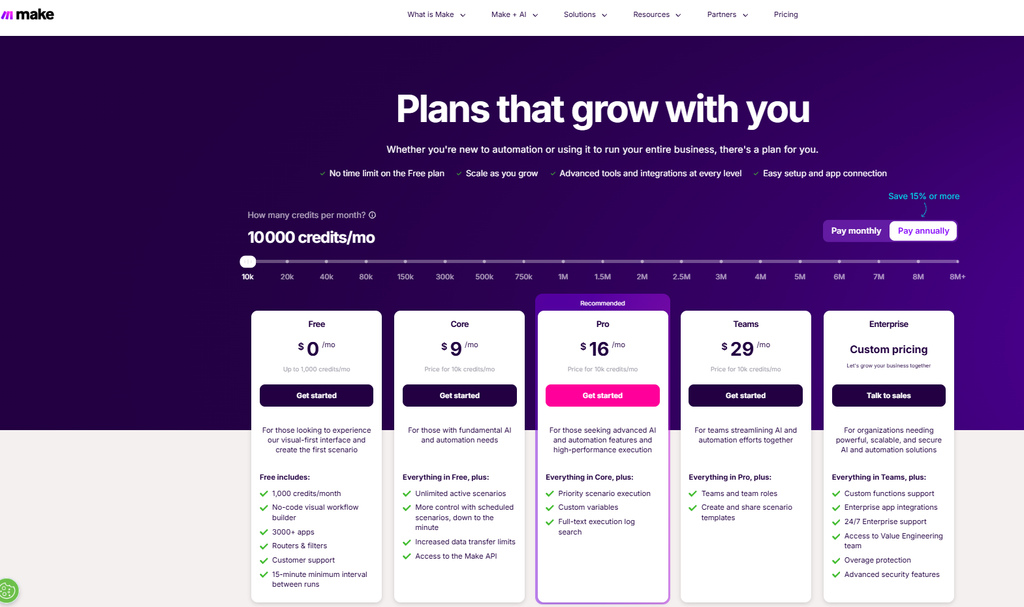
The most capable free tier for complex workflows.
- Best for: Teams who need multi-step logic and don’t mind a learning curve
- Pricing: Make now uses credits as its billing unit. The Free plan includes 1,000 credits/month, a 15-minute minimum interval between scheduled runs, and up to 2 active scenarios. The Core plan starts at $9/month for 10,000 credits/month, with unlimited active scenarios and scheduling down to one minute. The Pro plan starts at $16/month for 10,000 credits/month and adds priority execution, custom variables, and full-text execution log search. Teams starts at $29/month for 10,000 credits/month and adds team roles and shared scenario templates. Check Make’s pricing page for current tiers.
- Strengths: Visual flowchart builder that makes complex logic easier to follow. Credit-based pricing gives you a clear view of how individual scenario actions consume usage. Strong support for data transformation and routing. Multi-step workflows are available on the free tier.
- Limitations: Steeper learning curve than Zapier – the interface is powerful but not beginner-friendly. Honestly, Make can feel like learning a new programming paradigm if you’re coming from simple trigger-action tools. The free tier’s 2-active-scenario limit is a real restriction: if you need more than a couple of live automations, you’ll need a paid plan.
- Worth knowing: Make’s free tier looks generous on paper because you get 1,000 credits, but the 2-scenario cap can be the real constraint for teams that need several live automations. Budget for the Core plan if you’re serious about running more than two active scenarios.
n8n
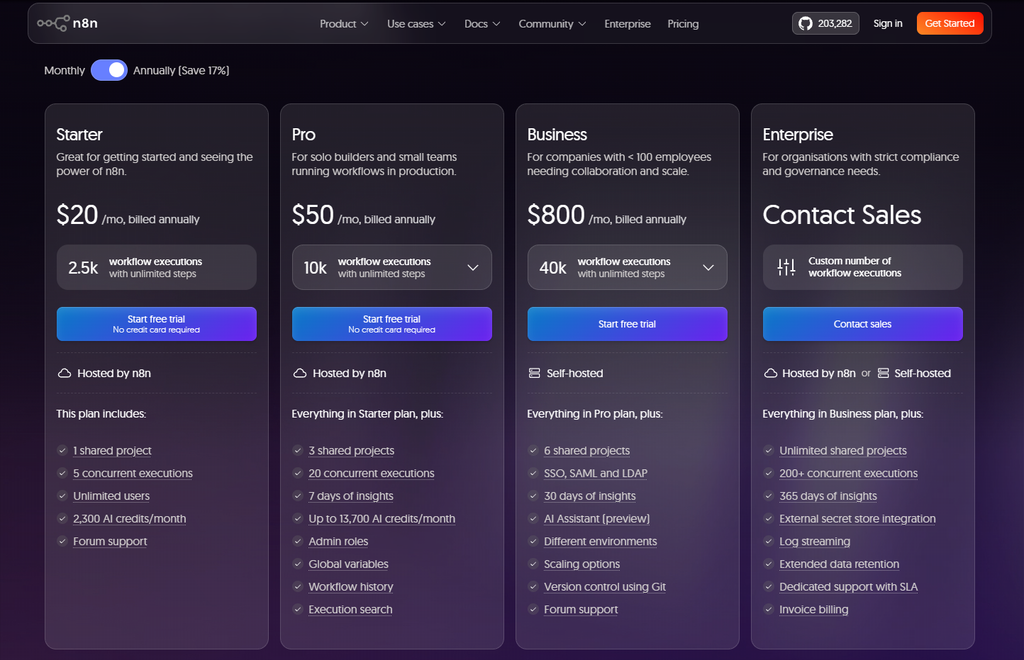
Free if you can host it yourself – genuinely unlimited executions on the self-hosted Community Edition.
- Best for: Technical teams and developers who want full control and no per-task cloud limits
- Pricing: Self-hosted Community Edition is available free of charge for permitted self-hosted use. n8n’s hosted Starter plan is €20/month when billed annually for 2,500 workflow executions with unlimited steps. Pro is €50/month when billed annually for 10,000 workflow executions. Business is €667/month when billed annually for 40,000 workflow executions. Check n8n’s pricing page for current figures and licensing details.
- Strengths: No execution limits on self-hosted instances. Full control over your data and infrastructure. Active open-source community with a growing library of integrations.
- Limitations: n8n is a low-code tool, not a pure no-code platform. Advanced workflows can use JavaScript or Python, and self-hosting means you’re responsible for uptime, updates, backups, and security. That’s ongoing infrastructure work. The cloud version removes that burden but comes with its own pricing and execution limits.
- Worth knowing: The “free” benefit only applies to the self-hosted Community Edition and permitted use cases. For non-technical teams, the cloud version or a different tool is more practical.
Pabbly Connect
Task-based pricing with unlimited workflows – useful at high volumes.
- Best for: Teams who want predictable costs and run a high number of tasks per month
- Pricing: Pabbly Connect uses task-based pricing and offers unlimited workflows on its paid plans. Its current pricing page lists a free plan with 100 tasks, a Standard plan with 10,000 tasks/month, a Pro plan with 20,000 tasks/month, and an Unlimited plan with unlimited tasks. Pricing varies depending on monthly, yearly, and other billing options, so check Pabbly Connect’s current pricing before committing.
- Strengths: Unlimited workflows on paid plans means you’re not penalized for creating more automations. Internal steps such as filters, routers, and formatters do not count as tasks under Pabbly’s current model. The Unlimited plan removes the monthly task ceiling.
- Limitations: Smaller app library than Zapier or Make – some integrations are less polished. The interface is functional but not as refined as the market leaders.
- Worth knowing: Pabbly offers both task-based plans and an Unlimited plan. That makes it particularly interesting for teams where task volume is high enough that traditional usage-based pricing becomes expensive.
IFTTT
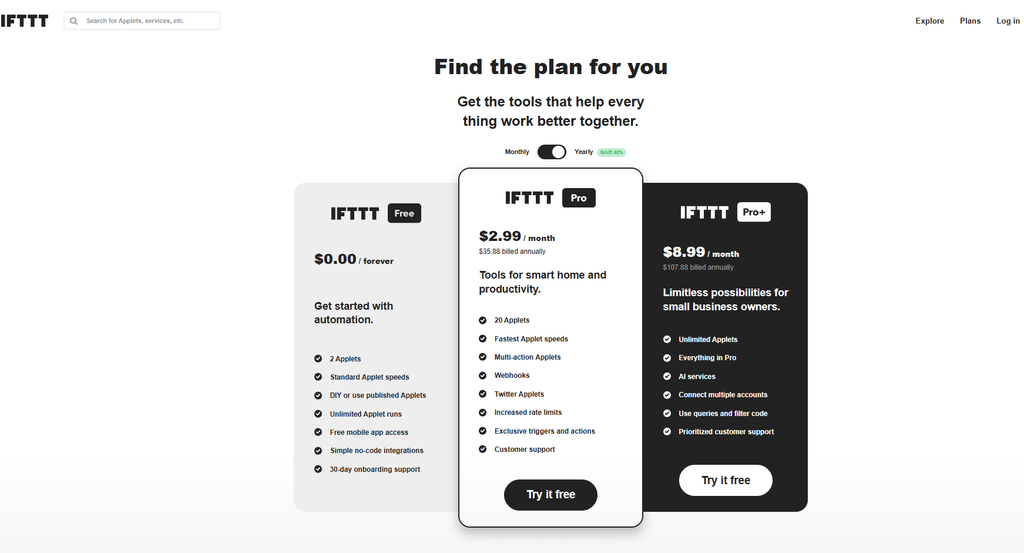
Simple, consumer-grade – more capable than it looks, but still not a full business automation platform.
- Best for: Personal automations or very simple workflows
- Pricing: Free: $0/month with 2 Applets and unlimited Applet runs. Pro: $2.99/month or $35.88 billed annually, with up to 20 Applets, multi-action Applets, webhooks, and faster speeds. Pro+: $8.99/month or $107.88 billed annually, with unlimited Applets, AI services, filter code, multiple account connections, and priority support. Check IFTTT’s plans page for current pricing.
- Strengths: Extremely easy to set up. Works well for simple “if this, then that” personal automations. Pro+ is more capable than IFTTT’s reputation suggests – filter code provides conditional logic, and multi-action Applets make more involved workflows possible.
- Limitations: The free tier’s 2-Applet limit makes it impractical for most business automation. Even Pro+ is more consumer- and prosumer-focused than Zapier, Make, or n8n, and it’s not designed for complex business workflows with extensive data transformation and operational controls.
- Worth knowing: IFTTT Pro+ is a real step up from the free tier, but it’s still best thought of as a personal productivity and connected-services tool. If you’re running business workflows that need more complex logic and operational control, you’ll likely outgrow it.
Microsoft Power Automate
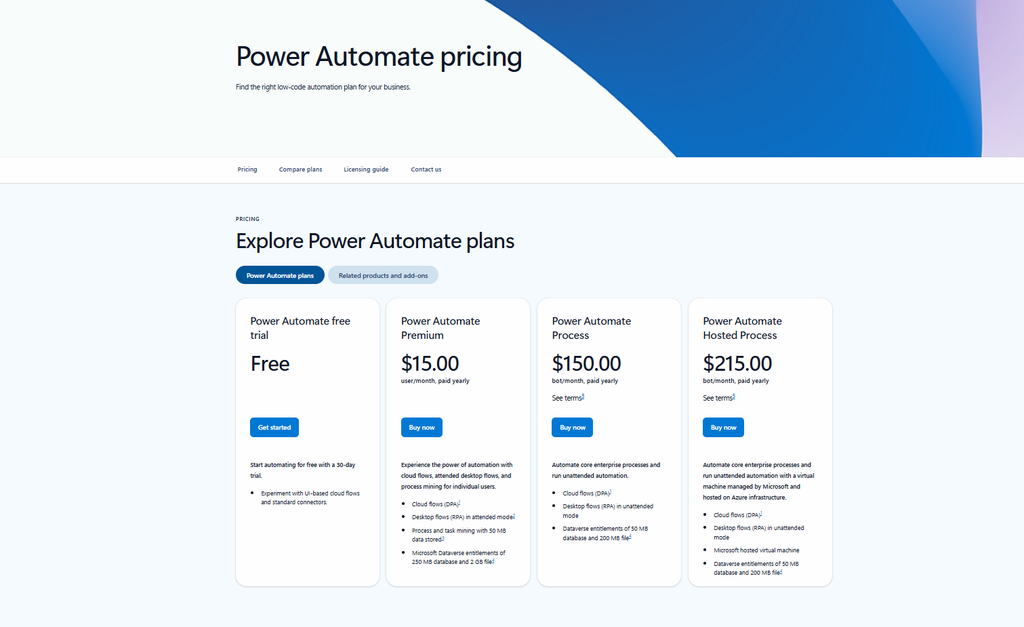
The right fit if your team lives in Microsoft 365 – otherwise, probably not.
- Best for: Teams already using Teams, SharePoint, Outlook, and other Microsoft products
- Pricing: Some Microsoft 365 subscriptions provide access to Power Automate capabilities with standard connectors and certain cloud flows, but this does not mean every Power Automate feature is included. Power Automate Premium is currently $15/user/month when paid yearly and includes premium capabilities such as premium connectors and attended RPA. Microsoft also offers Power Automate Process at $150/bot/month and Hosted Process at $215/bot/month, both paid yearly. Check Microsoft’s current Power Automate pricing for licensing details.
- Strengths: Deep, native integration with the Microsoft ecosystem. Strong for automating document workflows, approval processes, and Teams notifications.
- Limitations: The interface is more complex and enterprise-oriented. “Included with Microsoft 365” is too broad – the capabilities available depend on the license and connectors involved. Connecting to premium services or using premium capabilities can require additional licensing. For teams outside the Microsoft ecosystem, the setup cost is high and the benefit is lower.
- Worth knowing: If your team is already deep in Microsoft 365, Power Automate is worth exploring seriously. If you’re not, the learning curve and licensing complexity can make it a poor fit for a small team.
Activepieces
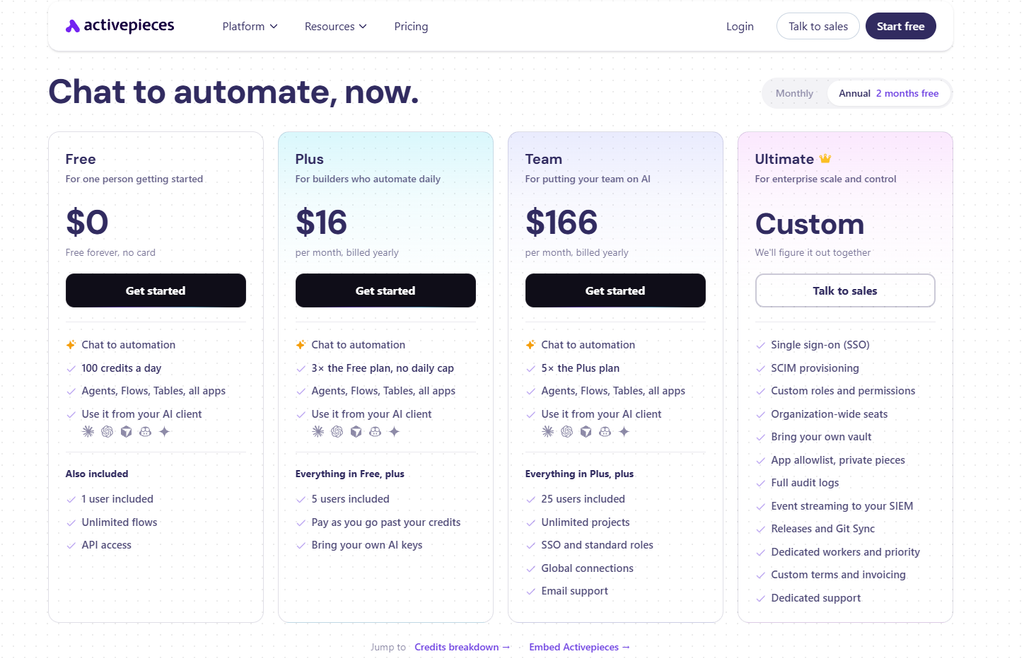
An open-source Zapier-like experience with a genuinely usable free tier.
- Best for: Teams who want an open-source alternative with a familiar interface
- Pricing: Free cloud: $0/month with 100 credits per day, unlimited flows, all apps, one user, and API access. Plus: $16/month when billed yearly with 10,000 credits/month and up to 5 users. Team: $166/month when billed yearly with 50,000 credits/month and 25 included users. Activepieces also offers self-hosting options. Check Activepieces’ pricing page for current plans.
- Strengths: Clean, Zapier-like interface that’s easier to pick up than n8n. The free cloud tier is actually workable for small teams – it’s not just a short trial. Open-source availability gives teams more control over deployment. Growing integration library.
- Limitations: Still maturing – the integration library is smaller than Zapier’s or Make’s. Verify that your specific apps are supported before committing. The credit system also takes a moment to understand, especially once AI steps are involved.
- Worth knowing: Activepieces sits in an interesting spot: it’s more approachable than n8n but offers more deployment flexibility than many traditional SaaS automation platforms. If you want an open-source option without taking on as much complexity as n8n, it’s worth a serious look.
CheapWorkflow
Flat monthly pricing built specifically for small teams.
- Best for: Small businesses running regular, repeatable workflows who want to know exactly what they’ll pay each month
- Pricing: Flat monthly fee – no per-task charges, no surprise overage bills. Designed for teams who want predictable automation costs without scaling enterprise pricing down.
- Strengths: Predictable pricing is the core differentiator. No task counting, no mid-month billing surprises. Built for teams who want to connect their everyday tools and keep work moving – not for teams who need enterprise audit logs and admin controls.
- Limitations: Not the right fit if you need a huge integration library or enterprise-grade compliance features.
- Worth knowing: If Zapier feels like paying for a truck when you need a van, CheapWorkflow is sized for the work you actually do.
Quick Comparison Table
| Tool | Pricing model | Free option | Best for | Difficulty | Main limitation |
|---|---|---|---|---|---|
| Make | Credit-based | 1,000 credits/month | Complex multi-step workflows | Medium–High | 2 active scenarios on Free; learning curve |
| n8n | Execution-based cloud / Free self-hosted Community Edition | Self-hosted | Developers and technical teams | High | Requires technical setup; low-code rather than pure no-code |
| Pabbly Connect | Task-based / Unlimited plan available | 100 tasks | High-volume teams on a budget | Medium | Smaller app library; verify required integrations |
| IFTTT | Applet-based | 2 Applets | Personal and simple automations | Low | Limited compared with business automation platforms |
| Microsoft Power Automate | Per-user / premium licensing | Basic capabilities may be included with some Microsoft 365 plans | Microsoft 365 teams | High | Licensing and premium connectors can add complexity and cost |
| Activepieces | Credit-based cloud / self-hosted | 100 credits/day cloud | Open-source alternative | Medium | Smaller integration library; credit model takes some learning |
| CheapWorkflow | Flat monthly | Yes | Small teams, predictable costs | Low–Medium | Not aimed at enterprise-scale requirements |
Zapier vs. the Alternatives: When Does Zapier Still Win?
This is worth saying clearly: Zapier is the right choice for a lot of teams. Here’s when it makes sense to stay.
You need a massive integration library. Zapier connects to 9,000+ apps. If your team uses obscure or niche tools that smaller platforms haven’t integrated yet, Zapier’s library is genuinely hard to match.
You run complex, high-volume workflows. If your team processes tens of thousands of tasks per month across sophisticated multi-step workflows, Zapier’s infrastructure and reliability may be worth the cost. The Zapier vs. alternatives question tips toward Zapier when volume and complexity are both high.
You have a dedicated ops person. If someone on your team owns automation as part of their role, Zapier’s depth – error handling, audit capabilities, team workspaces, and administration – pays off. It’s a professional tool that rewards professional management.
You need enterprise-grade reliability and support. Zapier’s Team and Enterprise plans include collaboration, SSO, and advanced administration features. If those matter for compliance or security reasons, the alternatives in this list don’t all match that level.
The point isn’t that Zapier is overpriced. Its pricing is calibrated for teams who use its broader feature set. If you don’t, another tool may provide better value for your particular workflows.
How to Switch from Zapier Without Breaking Your Workflows
Switching automation tools is low-risk if you do it methodically. Here’s the process that works.
Step 1: Audit your current Zaps. List every active Zap. For each one, note what it does, which apps it connects, and roughly how many tasks it uses per month. This takes some time and saves you from surprises later.
Step 2: Separate simple from complex. Simple workflows have one trigger and one or two actions. Complex ones have conditional paths, filters, multiple steps, or data transformations. Keep these lists separate.
Step 3: Migrate the simple ones first. Rebuild your simple workflows on the new platform. Test each one – trigger it manually, confirm the output is correct, check that the data lands where it should.
Step 4: Run both in parallel for one week. Don’t cancel Zapier yet. Let both platforms run the same workflows simultaneously for seven days where practical. Compare outputs. Catch edge cases. This is the step most people skip and then regret.
Step 5: Cancel or downgrade Zapier only after the parallel week is clean. Once you’ve confirmed the replacements are working correctly, you can safely turn off the Zaps on Zapier and cancel or downgrade your plan.
For a more detailed walkthrough of the rollout process, the workflow automation implementation guide covers how to introduce automation changes to your team without disrupting live workflows.
Frequently Asked Questions
What is the best free alternative to Zapier?
Make offers a strong free tier with 1,000 credits per month and support for multi-step workflows. n8n can be free when self-hosted through its Community Edition. Activepieces also offers a free cloud tier with 100 credits per day. IFTTT has a free plan, but it is limited to 2 Applets. For many small business workflows, Make is a good place to start.
Is there a cheaper alternative to Zapier?
Yes. Pabbly Connect uses task-based pricing with unlimited workflows on paid tiers and also offers an Unlimited plan. CheapWorkflow offers flat monthly pricing designed for small teams. n8n can be free when self-hosted. The right fit depends on your task volume, technical comfort, and which apps you need to connect.
Can I switch from Zapier without losing my automations?
You can rebuild your workflows on another platform, but there isn’t a universal one-click import process across Zapier and its alternatives. The practical approach is to audit your active Zaps, rebuild the simple ones first on the new platform, run both in parallel for a period, and then turn off Zapier once the replacements are confirmed working. The amount of work depends on how many workflows you have and how complex they are.
What is the difference between Zapier and Make?
Zapier uses tasks as its main usage unit, while Make uses credits based on scenario activity. Make also uses a visual scenario builder that some users find clearer for complex logic. Zapier has a larger app library and is generally easier for beginners. The Make vs. Zapier decision usually comes down to whether you value Zapier’s large integration ecosystem and simpler approach or Make’s visual control over more complex workflows.
Is n8n really free?
n8n’s self-hosted Community Edition is available without a subscription fee for permitted self-hosted use, and self-hosted execution is not limited in the same way as n8n Cloud. You still need to provide and maintain the infrastructure yourself. The Cloud Starter plan is currently €20/month when billed annually. For non-technical teams, the cloud version or a different alternative is usually more practical.
What should a small business look for in a Zapier alternative?
Three things: (1) Does it connect the specific apps your team uses – not “thousands of integrations” in general, but your apps? (2) Is the pricing model predictable at your actual task or execution volume? (3) Can your team maintain it without a developer? A tool with affordable workflow automation pricing and a clean interface beats a feature-rich platform your team can’t use independently. Simpler is often better for small teams.
Running a small team and tired of task-based billing surprises? Try CheapWorkflow free – flat monthly pricing, no per-task limits, and no enterprise complexity you’ll never use.
Ready to switch? See the best Zapier alternatives we’ve tested – with pricing, pros, and who each one suits.