
Key Takeaways
The direct verdict: Zapier is easier to start with. Make can be more cost-effective for many higher-volume or more complex workflows, while Zapier is often easier for straightforward automations. Neither is universally “best” – the right choice depends on your team’s technical comfort, workflow complexity, and monthly volume.
- Choose Zapier if you need fast setup, a very large app ecosystem, and simple linear automations.
- Choose Make if you run multi-step workflows, need branching logic, or want more visual control over complex scenarios.
- Pricing gap is real: Make’s Core plan starts at $12/month for 10,000 credits/month when billed annually. Zapier’s Professional plan starts at $19.99/month when billed annually, with 750 tasks/month.
- Switching is possible but takes planning – expect a rebuild rather than a one-click migration.
Pricing checked September 2026 from official Make.com and Zapier pricing pages.
What Is Make (and What Is Zapier)?
Both platforms connect your apps and automate repetitive tasks without writing code. That’s where the similarity ends.
Zapier launched in 2011 and built its reputation on simplicity. You pick a trigger app, pick an action app, and you’re done. It’s the platform that made automation accessible to non-technical teams. Today it supports 9,000+ apps.
Make (formerly Integromat, rebranded in 2022) takes a visual, flowchart-style approach. Instead of a linear trigger-action chain, you build scenarios on a canvas – with routers, filters, iterators, and branching paths. It’s more powerful and flexible for complex workflows, but it has a steeper learning curve. Make currently lists 3,000+ apps.
Both platforms are well-regarded. The question isn’t which one is better in the abstract – it’s which one fits your situation.
Make vs Zapier Pricing: What You Actually Pay in 2026
This is where most comparisons get vague. Here’s the concrete breakdown.
Make Pricing (September 2026)
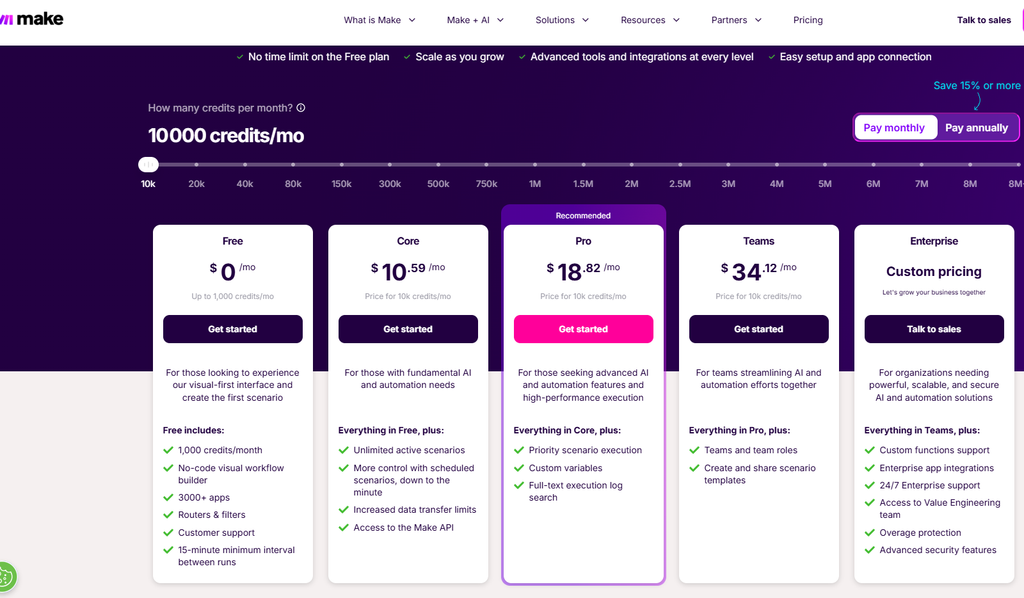
| Plan | Monthly Price (Annual) | Credits/Month | Active Scenarios | Min. Interval |
|---|---|---|---|---|
| Free | $0 | 1,000 | 2 | 15 min |
| Core | $12 | 10,000 | Unlimited | 1 min |
| Pro | $21 | 10,000 | Unlimited | 1 min |
| Teams | $38 | 10,000 | Unlimited | 1 min |
| Enterprise | Custom | Custom | Unlimited | Custom |
Make’s current pricing page lists 1,000 credits/month on Free, 10,000 credits/month at the displayed Core, Pro and Teams levels, and 2 active scenarios on Free. Paid plans allow unlimited active scenarios.
Important terminology note: Make replaced operations as its billing-unit terminology with credits on August 27, 2025. Operations still refer to individual module runs, while credits are the billing currency. Most standard non-AI modules use 1 credit per operation, but some features, particularly certain AI functionality, can use credits differently based on usage.
Pro adds priority scenario execution, custom variables, and full-text execution log search. Teams adds team roles and scenario templates.
Zapier Pricing (September 2026)
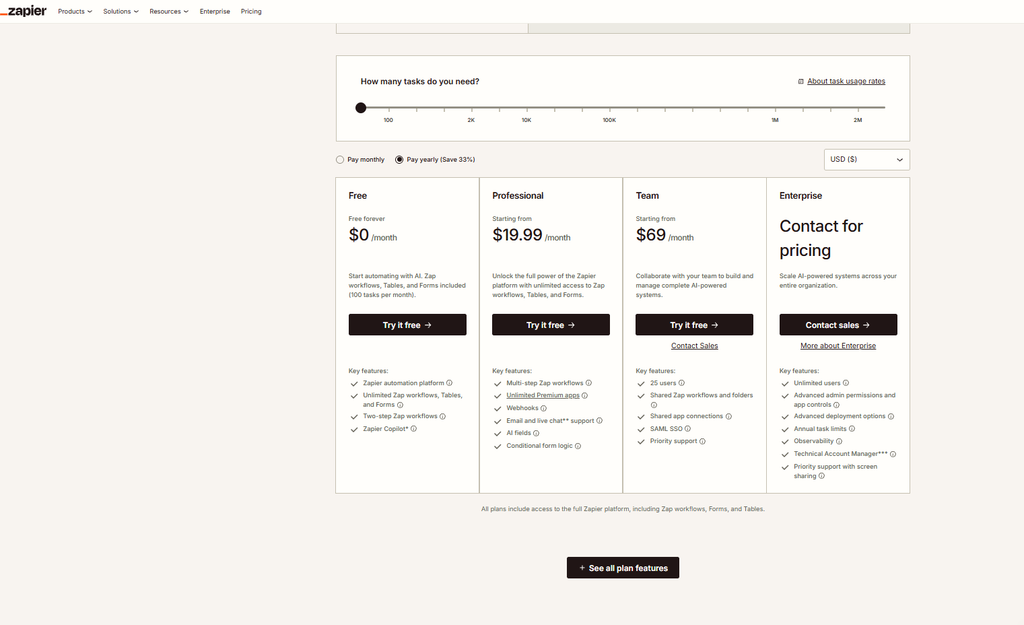
| Plan | Monthly Price (Annual) | Tasks/Month | Users | Polling |
|---|---|---|---|---|
| Free | $0 | 100 | 1 | 15 min |
| Professional | From $19.99 | 750+ | 1 | 2 min |
| Team | From $69 | 2,000+ | 25 | 1 min |
| Enterprise | Custom | Custom | Unlimited | 1 min |
Zapier’s current pricing page shows the Professional plan starting at $19.99/month billed annually, with task tiers beginning at 750 tasks, while Team starts at $69/month. Zapier also offers larger task tiers.
Zapier’s current platform also includes Tables and Forms in its core plans. Add-on products such as Agents and Chatbots can be purchased separately.
One important Zapier clarification: Most successful action steps count as tasks, while built-in tools such as Filters, Paths, Formatter, Delay, Looping, Tables and Forms do not consume tasks. Some newer capabilities can have different task rates, so users should check Zapier’s current task-usage rules rather than assuming every step costs exactly one task.
If you’re already feeling the pinch of Zapier’s cost escalation, see our breakdown of Is Zapier Too Expensive? – it walks through exactly where the bill grows and when switching makes financial sense. You can also run the numbers for your specific setup with our Automation ROI Calculator.
Make Operations vs Zapier Tasks: The Billing Model Difference
This is the most misunderstood part of the comparison – and it matters more than the headline price.
Zapier counts tasks for successful units of work. A standard action step in a Zap generally uses one task. If a workflow contains five successful action steps and runs 200 times, those standard actions would account for about 1,000 tasks. Some newer Zapier capabilities have different task rates.
Make uses credits as its billing currency. For standard non-AI modules, one operation generally uses one credit. However, Make’s current credit system also supports usage-based pricing for certain AI and advanced features, so one credit should not be treated as a universal equivalent for every type of operation.
The practical implication: For simple workflows, both platforms charge according to the work performed. For more complex workflows, Make’s visual scenario architecture can make routing, iteration, aggregation and data processing easier to manage within one scenario.
[OPINION] The credits-vs-tasks distinction is partly a difference in billing terminology. Both platforms charge according to usage, but their workflow architectures and pricing rules differ.
Feature-by-Feature Comparison
Full Comparison Table
| Feature | Make | Zapier | Edge |
|---|---|---|---|
| Free plan | 1,000 credits, 2 active scenarios | 100 tasks, two-step Zaps | Depends on use |
| Entry paid plan | $12/mo, 10,000 credits | From $19.99/mo, 750-task tier | Make |
| App integrations | 3,000+ | 9,000+ | Zapier |
| Workflow style | Visual canvas, branching | Visual editor with multi-step workflows and Paths | Make (complex) / Zapier (simple) |
| Minimum polling | 1 min (paid) | 2 min Professional, 1 min Team | Tie |
| Multi-step workflows | Supported on paid plans | Professional+ | Depends on needs |
| Conditional logic | Routers and filters | Filters and Paths | Tie |
| Webhooks | Available on paid plans | Professional+ | Depends on plan |
| Team collaboration | Teams plan | Team plan | Depends on budget/features |
| AI features | Maia, AI Agents, AI Toolkit and other AI capabilities | Copilot, AI fields, Agents and other AI capabilities | Depends on use case |
| Learning curve | Steeper | Gentler | Zapier |
| Custom code | Make Code on paid plans | Code by Zapier | Tie |
| Enterprise security | Enterprise security features | Enterprise security and governance features | Depends on requirements |
| Support | Plan-dependent | Plan-dependent | Depends on plan |
| Pricing model | Credit-based | Task-based | Depends on workload |
Integrations: Quality vs Quantity
Zapier’s 9,000+ apps are a genuine advantage. If you need to connect a niche CRM, a legacy project management tool, or a specialized industry app, Zapier is more likely to have a dedicated integration.
Make currently lists 3,000+ apps, including verified and community apps. It also supports webhooks and HTTP/API-based connections for services that are not available as native integrations.
The important distinction is not just the number of integrations. Check whether the platform supports the specific triggers, actions and API capabilities your workflow actually needs.
Workflow Complexity
Zapier’s workflow model works well for straightforward automations: “When X happens in App A, do Y in App B.” Its current platform also supports multi-step workflows, Filters and Paths for conditional and branching logic.
Make is particularly strong when you need a visual representation of complex processes. Routers can split a scenario into different paths, while iterators and aggregators help process and combine collections of data.
AI Features
Both platforms have invested heavily in AI tooling.
Make offers Maia, Make AI Agents, AI Toolkit, Make Code and other AI capabilities across its ecosystem.
Zapier offers Copilot, AI fields, Agents and other AI capabilities as part of its broader automation platform.
[OPINION] Neither platform has a universal AI advantage. The better choice depends on whether you prioritise simpler AI-assisted automation or more visual control over complex workflows.
Real Cost Examples: 3 Workflow Scenarios
These are illustrative scenarios. Actual credit/task consumption depends on your specific setup.
Scenario 1: Simple Lead Routing (Beginner)
The workflow: New form submission → add to CRM → send Slack notification → send welcome email. Runs ~300 times/month. If the three downstream actions each use one standard task/credit, that is approximately 900 tasks or credits.
- Zapier: 900 standard tasks would exceed the 750-task Professional tier, so you would need a larger task tier or additional usage-based charges.
- Make: 900 standard module operations would fit within the 10,000-credit Core plan.
- Result: Make has more included standard usage at the displayed entry-level paid price.
Scenario 2: Mid-Complexity E-Commerce Automation (Small Business)
The workflow: New order → check inventory → if in stock: update fulfillment system + notify warehouse + send confirmation email; if out of stock: alert purchasing team + send backorder email. Runs ~500 times/month.
The exact number of tasks or credits cannot be determined from the workflow description alone because it depends on which branches execute, which steps are successful, and how each platform bills the specific actions.
- Zapier: Paths allow multiple outcomes within one Zap, so branching does not inherently require separate Zaps.
- Make: Routers allow multiple paths to be handled within one scenario.
- Result: Make may be more attractive for complex branching, but the actual cost should be calculated from the specific modules and actions involved.
Scenario 3: Agency-Scale Multi-Client Automation (High Volume)
The workflow: 15 clients, each with 5–8 active automations, averaging 8,000 standard tasks/credits per month total across all workflows, with team collaboration needed.
- Zapier: You need a task tier that covers your actual usage, and Team pricing begins at $69/month.
- Make: 8,000 standard credits fit within the displayed 10,000-credit Teams plan at $38/month.
- Result: At this specific usage level, Make’s displayed Teams price is lower.
These examples use the pricing displayed by the official platforms in September 2026. Actual billing depends on the specific workflow design, plan and usage rules.
Who Should Use Make vs Zapier?
Beginners and First-Time Automators
Start with Zapier. The interface is intuitive, the template ecosystem is large, and simple automations can be built quickly. The free plan includes 100 tasks/month, which is enough to test a basic workflow. When you’re ready to go deeper on how to automate repetitive tasks, you’ll have a clearer sense of what complexity you actually need.
Small Business Owners
It depends on your workflows. If you’re connecting two or three apps in a straight line (form → CRM → email), Zapier’s simplicity may be the better fit. If you’re managing inventory, routing leads based on criteria, or running multi-step processes, Make’s visual scenario builder may be a better fit. For a broader look at what automation can do for your business, our workflow automation for small business guide covers the highest-ROI starting points.
Agencies and Freelancers Managing Multiple Clients
Make can be a strong fit. Its visual scenarios, reusable templates and team features can be useful when workflows become more complex. Whether it is cheaper for your agency depends on your actual task/credit usage and required plan features.
Teams Running Complex, High-Volume Workflows
Make is often the stronger fit. Its visual canvas handles conditional logic, loops, data processing and multi-path workflows well. The learning curve is real, but the additional control can be valuable for teams running complex automations.
Teams Needing Enterprise Security and Compliance
Compare both carefully. Zapier offers SAML SSO, SCIM and enterprise governance features, while Make also provides enterprise security capabilities. The right choice depends on your specific compliance and governance requirements rather than simply choosing one platform by default.
Should I Switch from Zapier to Make?
This is the question many automation users consider – and the answer is: it can make sense when your workflows have become expensive or difficult to maintain.
When Switching Makes Sense
- Your monthly Zapier bill is climbing and usage is the main driver.
- You’re building workflows with multiple branches or conditional paths.
- You need to process arrays or loop through lists of records.
- You want more visual control over complex workflows.
- You have a team member willing to invest time learning Make’s interface.
When Staying on Zapier Makes Sense
- Your automations are simple and your current bill is reasonable.
- You rely on apps or features that fit Zapier better.
- Your team has little appetite for learning a different workflow builder.
- Enterprise requirements favor Zapier’s available governance and support features.
What a Migration Actually Looks Like
There is no one-click migration from Zapier to Make. In most cases, workflows need to be rebuilt and tested.
- Audit your Zaps. List every active Zap, its trigger, actions, and monthly run count. Identify which ones are simple and which ones need more planning.
- Start with Make’s free plan. Rebuild a few simple Zaps as Make scenarios and become familiar with the canvas.
- Rebuild in parallel. Keep Zapier running while you test the corresponding Make scenarios.
- Switch over and monitor. Turn off Zapier automations gradually once the Make scenarios prove stable.
- Downgrade or cancel Zapier. Once everything you need is running reliably in Make, decide whether to keep Zapier for specific workflows or remove it entirely.
For a detailed walkthrough of rolling out automation changes without disrupting your team, our workflow automation implementation guide covers the process step by step.
[USER EXPERIENCE – directional, not a direct quote] Automation communities frequently discuss moving from Zapier to Make when pricing or workflow complexity becomes a concern. The rebuild can be manageable for simple workflows but more involved for complex ones.
Make vs Zapier: What the Community Says
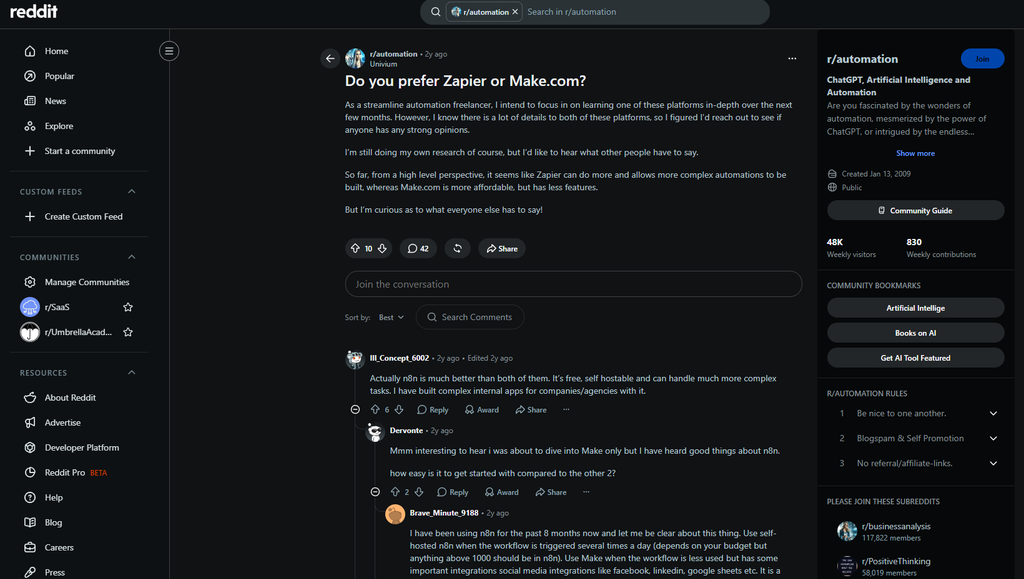
[USER EXPERIENCE – directional summary from automation communities. No direct quotes fabricated.]
The consistent pattern across automation communities:
- Zapier is frequently praised for ease of use, speed of setup, and its large app ecosystem. Common complaints include pricing at higher usage levels and managing more complex workflows.
- Make is frequently praised for its visual canvas, granular workflow control and ability to handle complex scenarios. Common complaints include its steeper learning curve.
- The switch trigger is often a combination of price and workflow complexity rather than one single feature.
Neither platform dominates every use case. The choice is situational.
Make or Zapier: The Verdict
| Situation | Recommended Platform |
|---|---|
| First automation, no technical background | Zapier |
| Simple 2–3 step workflows, low volume | Zapier |
| Complex branching workflows | Make |
| High-volume standard automations | Make can be more cost-effective |
| Agency managing complex workflows | Make |
| Team collaboration on a budget | Make can be more cost-effective |
| Enterprise compliance requirements | Compare both |
| Niche app integrations | Zapier |
| Switching from Zapier due to cost | Make is worth evaluating |
The bottom line: Zapier is often the better starting point for beginners and straightforward automations. Make becomes increasingly attractive as workflow complexity and usage grow.
If you’re evaluating other options beyond these two – including self-hosted alternatives – our n8n vs Zapier comparison covers the open-source angle in detail.
FAQ
Is Make cheaper than Zapier?
Make can be cheaper for many higher-volume standard workflows. Make’s Core plan starts at $12/month annually for 10,000 credits, while Zapier’s Professional plan starts at $19.99/month annually and its displayed entry tier includes 750 tasks. Actual cost depends on how your workflows consume credits or tasks.
Can Make replace Zapier completely?
For many use cases, yes. Make currently lists 3,000+ apps and also supports webhooks and HTTP/API-based connections. Zapier has a broader app ecosystem, so the better option depends on the applications and workflow features you need.
Is Make harder to use than Zapier?
Make generally has a steeper learning curve because its visual scenario builder exposes more workflow logic and configuration. Zapier is usually easier for beginners building straightforward automations.
What are Make operations vs Zapier tasks?
Make uses credits as its billing currency. Operations are individual module runs, and most standard non-AI operations use one credit. Zapier uses tasks for successful units of work, with some newer capabilities using different task rates.
Does Zapier charge for triggers?
Standard Zapier triggers do not consume tasks. Built-in tools including Filters, Paths, Formatter, Delay, Looping, Tables and Forms also do not consume tasks, although some newer products and capabilities have their own usage rules.
Can I use both Make and Zapier at the same time?
Yes. Some teams use Zapier for simple workflows or niche integrations and Make for more complex scenarios. It adds management overhead but can be useful when different workflows suit different platforms.
How long does it take to migrate from Zapier to Make?
There is no universal timeline. Simple workflows can be rebuilt relatively quickly, while complex multi-branch scenarios can take significantly longer. The safest approach is to rebuild and test workflows in parallel before switching them off.
What is Make.com vs Zapier for AI automation?
Both platforms have expanded their AI capabilities. Make offers Maia, AI Agents and AI Toolkit capabilities, while Zapier offers Copilot, AI fields, Agents and other AI features. The better option depends on whether you prioritise simplicity or more complex workflow control.