

Key Takeaways
Sales data entry automation ROI typically ranges from 150% to 2,400% in year one, depending on team size and how much you automate. The median benchmark is $3 back for every $1 invested – rising to $8–$30 with AI-assisted tools. Most small teams hit payback in 3–6 months. But the biggest mistake is only counting hours. Errors, missed follow-ups, and lost deals are where the real money hides.
The Real Cost of Manual Sales Data Entry (Most Teams Undercount It)
Most sales managers look at data entry costs and see one number: hours spent. That’s only a fraction of the picture.
Time cost. According to Salesforce’s State of Sales report, sales reps spend roughly 60–70% of their week on non-selling work. That includes meetings, admin, and – most painfully – manual data entry. Research from Optif.ai studying 721 sales reps found that 65% of sales time goes to non-selling activities, with 6–8 hours per week eaten up by data entry alone.
Error cost. Bad data isn’t just annoying – it’s expensive. 76% of CRM users admit that less than half their CRM data is accurate. Gartner pegs the average cost of poor data quality at $12.9 million per year for enterprises. For a small business, you don’t need enterprise-scale damage. One bad record means a missed follow-up. A missed follow-up means a lost deal. That’s the data entry error cost that never shows up in a spreadsheet.
Opportunity cost. Every hour a rep spends on data entry is an hour not spent selling. Optif.ai’s research puts this in stark terms: a 10-person sales team spending 18.9 hours per week on admin tasks represents $353,808 per year in lost selling capacity – the equivalent of nearly five full-time reps who never make a single call.
Hidden costs. Re-entering the same data across three tools. Chasing a colleague to update the CRM after a call. Fixing duplicate records before a quarterly review. These tasks don’t appear on any time-tracking report, but they compound every week.
What “Automating Sales Data Entry” Actually Means

Before calculating ROI, it helps to know exactly what you’re automating. “Automate sales data entry” covers more ground than most people expect.
CRM auto-population from emails and calls. No more manual logging after every touchpoint. The system reads the email or call transcript and fills in the fields.
Lead capture → CRM sync. Web forms, LinkedIn lead ads, and paid campaigns push data directly into your CRM. Zero copy-paste, 100% accuracy.
Quote and proposal auto-fill. Pull existing CRM records to pre-populate proposals. No re-typing company names, contacts, or deal terms.
Follow-up task creation from call outcomes. When a deal moves to “Proposal Sent,” a follow-up task appears automatically – no manual reminder needed.
Meeting notes → CRM fields via AI transcription. Tools like Fireflies or Otter.ai transcribe calls and push structured summaries directly into CRM fields. This is where AI-assisted automation starts delivering the $8–$30 return per $1 invested.
Cross-tool sync. Slack deal updates → CRM. CRM → invoicing software. CRM → support tickets. When your tools talk to each other, your team stops being the messenger.
The ROI Benchmarks: What Real Teams Are Seeing
Here’s what the data actually shows across different team sizes and automation levels. These aren’t best-case projections – they’re benchmarks from analyzed implementations.
| Scenario | Team Size | Hours Saved/Week | Annual Labor Savings | Error Reduction | Estimated ROI (Year 1) |
|---|---|---|---|---|---|
| Conservative – partial automation (email sync + lead forms) | 5 reps | ~10 hrs/week | ~$26,000 | ~50% | ~150% |
| Moderate – core tasks automated (CRM sync, follow-ups, meeting notes) | 10 reps | 18–20 hrs/week | ~$50,000–$60,000 | ~80% | ~300–400% |
| Aggressive – full-stack automation (AI transcription, cross-tool sync, pipeline reporting) | 10 reps | ~40 hrs/week | ~$96,000 | ~94% | ~2,400% |
A few benchmarks worth anchoring to:
- CRM data entry automation achieves 3.2x higher ROI than other sales admin tasks, based on analysis of 47 sales teams.
- The median sales automation ROI is $3 returned per $1 invested. With AI-assisted automation, that rises to $8–$30 per $1.
- Payback period: 3–6 months for most SMBs implementing core tasks. 6–12 months for more complex, full-stack implementations.
- McKinsey research confirms that more than 30% of sales tasks are readily automatable with current technology – meaning most teams have significant untapped ROI sitting in their existing workflows.
The 2,400% figure is real, but it requires a committed full-stack implementation. For a 5-person team just starting out, 150% ROI in year one is a solid, honest target.
What to Automate First: A Tiered ROI Framework
Not all automation is created equal. Start with the tasks that pay back fastest and require the least setup. Here’s a practical framework for sequencing your investment.
Tier 1 – Automate Immediately (Highest ROI, Lowest Risk)
CRM field updates from emails and calls. This saves 2–3 hours per rep per week with near-zero implementation cost. It’s the single highest-ROI starting point for CRM data entry automation.
Lead form → CRM sync. Eliminates manual copy-paste entirely. Accuracy jumps to near 100% from day one.
Follow-up task auto-creation from deal stage changes. When a deal moves stages, a task appears. No configuration beyond a simple workflow rule. Reps stop dropping the ball – not because they’re more disciplined, but because the system handles it.
Tier 2 – Automate Next (Medium Complexity, Strong ROI)
Meeting notes → CRM via AI transcription. Slightly more setup, but it unlocks significant time saved automating data entry – especially for teams doing 10+ calls per week.
Cross-tool data sync. CRM ↔ invoicing. CRM ↔ support tickets. Once connected, data flows without anyone touching it. Automate CRM updates across your stack and you eliminate an entire category of manual work.
Quote and proposal auto-population. Pulls from existing CRM records. Reduces proposal prep time and removes a common source of errors.
Tier 3 – Automate Last (Complex, Higher Investment)
AI-driven lead scoring and routing. Powerful, but only valuable if your data is already clean and your team is using the CRM consistently.
Full pipeline reporting automation. Great for managers, but requires reliable upstream data. Don’t automate the report if the underlying records are still being entered manually.
Predictive follow-up sequencing. The highest ceiling for sales rep productivity – but also the highest implementation cost. Earn this one by getting Tiers 1 and 2 right first.
How to Calculate Your Own ROI (Step-by-Step)
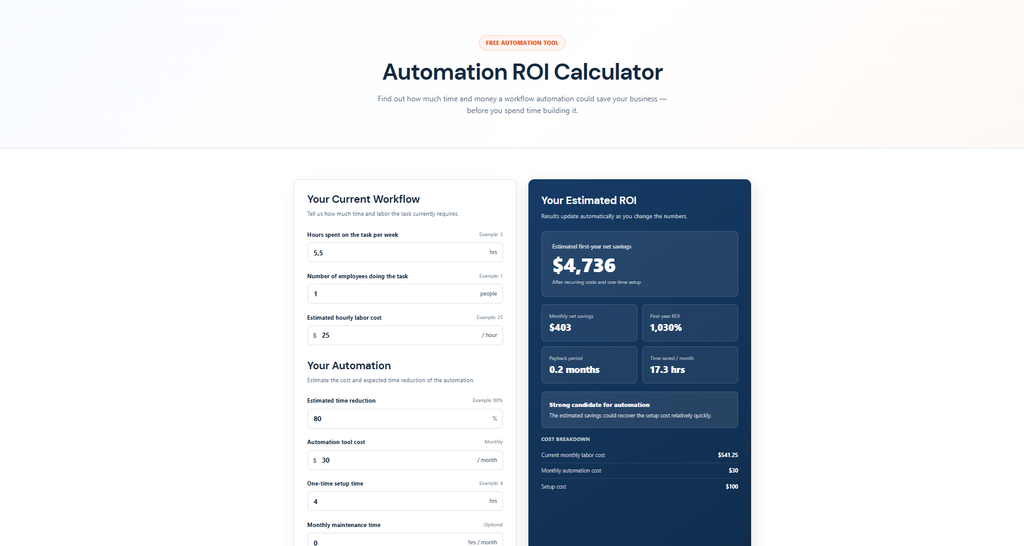
You don’t need a consultant to run this math. Here’s the formula, broken into five steps.
Step 1. Count hours per week per rep on data entry × number of reps × hourly fully-loaded cost.
Step 2. Estimate your error rate × average deal value at risk. Even a 5% error rate on a $10,000 average deal is meaningful.
Step 3. Add opportunity cost: hours not selling × average deal value generated per selling hour.
Step 4. Subtract tool cost + implementation time (use your hourly rate for internal setup hours).
Step 5. Net annual benefit ÷ total investment × 100 = your ROI%.
Worked example – 5-person team:
- 5 reps × 6 hrs/week data entry × $35/hr = $1,050/week in direct labor cost
- Annual direct cost: $54,600
- Assume 70% reduction from automation: $38,220 saved
- Error cost reduction (conservative): $5,000/year
- Opportunity cost recovered (2 extra selling hours/rep/week): $18,200/year
- Total annual benefit: ~$61,420
- Tool cost: $150/month = $1,800/year; implementation: 20 hrs × $35 = $700
- Total investment: $2,500
- ROI: ($61,420 − $2,500) ÷ $2,500 × 100 = 2,357%
Automation ROI Calculator Find out how much time and money a workflow automation could save your business — before you spend time building it.
Even with conservative assumptions, the numbers are hard to argue with. The real question isn’t whether to automate – it’s where to start.
When Automation Won’t Pay Off (Be Honest)

This section exists because most automation vendors won’t write it. Here’s when the ROI math simply doesn’t work.
Very low data volumes. Fewer than 50 records per month? Manual entry is faster. The setup cost and ongoing maintenance of an automation workflow won’t pay back at that scale.
Highly irregular, judgment-heavy data. Complex deal notes that require context, nuance, and interpretation don’t automate well. Forcing them into structured fields creates worse data, not better.
Teams with poor CRM adoption. If your reps aren’t using the CRM consistently today, automation won’t fix that. Automating a broken process makes it break faster. Fix adoption first, then automate.
No baseline measurement. If you don’t know how many hours your team currently spends on data entry or what your error rate is, you can’t prove ROI after the fact. You’ll spend money and have no way to know if it worked.
Tool sprawl. Adding automation on top of six disconnected tools without proper integration doesn’t simplify anything – it adds complexity. Before automating, map your stack. If your tools don’t connect cleanly, the first investment should be consolidation, not automation.
Measuring ROI After You Automate
Implementing automation is step one. Proving it worked is step two – and most teams skip it.
Track these metrics before and after:
- Hours saved per rep per week (the most direct measure of time saved automating data entry)
- CRM data completeness score (what percentage of required fields are filled)
- Lead response time (hours from form submission to first contact)
- Follow-up rate (percentage of deals with a logged next action)
- Pipeline data accuracy (spot-check 20 records per month)
Set a 90-day review checkpoint. Automation ROI stabilizes after roughly 90 days of consistent use – that’s when adoption is solid and the workflow has been refined. Don’t judge results at day 30.
Watch for this red flag: if reps are still manually entering data 30 days after launch, adoption has failed. The fix is almost never the tool – it’s the workflow. Go back and remove the friction that’s making manual entry feel easier than the automated path.
HubSpot’s research confirms that sales pros using AI and automation tools save roughly 2 hours per day on repetitive tasks. That’s only true if the tools are actually being used.
FAQ
How long does it take to see ROI from automating sales data entry?
Most small teams see measurable ROI within 3–6 months of implementing Tier 1 automations (CRM field sync, lead form capture, follow-up task creation). More complex implementations – full-stack automation with AI transcription and cross-tool sync – typically take 6–12 months to reach full payback. The 90-day mark is when results start to stabilize.
What’s a realistic ROI percentage for a small team?
For a 5-person team doing partial automation, 150% ROI in year one is a conservative but realistic target. The median across sales automation implementations is around 300–400% once core tasks are covered. The 2,400% figures you see cited are real – but they reflect full-stack implementations with strong adoption, not a first-month result.
Does automating data entry hurt data quality?
Done right, it dramatically improves it. CRM data entry automation removes the human error that causes typos, duplicate records, and missing fields. The 94% error reduction benchmark comes from teams that replaced manual entry with structured, rule-based automation. The risk to data quality comes from poorly configured automations – garbage in, garbage out still applies.
What’s the cheapest way to start automating sales data entry?
Start with your CRM’s native automation features before buying anything new. Most CRMs (HubSpot, Salesforce, Pipedrive) include basic workflow rules, lead form sync, and deal stage triggers at no extra cost. Layer in a lightweight integration tool like Zapier or Make only after you’ve exhausted native options. The cheapest path is always: use what you have, automate one task, measure it, then expand.
How do I measure ROI if I don’t have a baseline?
Run a two-week manual audit before you automate. Have each rep log their data entry time daily – even a rough estimate works. Count your CRM’s data completeness score (most CRMs show this natively). Check your follow-up rate from the last 30 days. These three numbers give you enough of a baseline to measure against after 90 days of automation. Imperfect data is far better than no data.